I have this little problem. I have found that, in some parts of the world – not always those you might suspect – certain websites can be extremely tricky to gain access to. It is not so much a matter of technical difficulty, nor even the alleged limitations of end-user intelligence, but rather a blatant display of misguided censorship.
To be fair, I have lived most of my adult life in a country where such problems have been mere horror stories, tales from far-away lands ruled by dictators and their frustrated egos. Objectively, the limitations enforced by my local religious and political castes are still quite cute compared to what I could find elsewhere. This is not me writing a treatise on individual rights, from my still very privileged standpoint. It is, however, my technical curiosity being tickled by the sound of people fiddling away with chains and shackles in my immediate vicinity.
Configuring proxies
Whenever we talk about circumventing online censorship, various solutions typically pop up, from several parts of the OSI model. At the network layer, routers can be used to send traffic through twisted paths, NAT-ing along the way to hide the packet’s true origin. If you do not have the privilege of having admin rights on such chunks of the Internet backbone, you might also achieve a similar result using a VPN service, or something more elaborate such as onion routing.
If your concerns are limited to a given application, say web traffic, you could however use something simpler: a proxy. I rather like proxies, and already worked a bit on routing HTTPS through them. Aside from the fact that you can use them very easily by tweaking an environment variable or a browser setting, you can also find tons of them available for use out there, for free.
A gentle warning perhaps: using freely-available proxies isn’t a prime example of good online hygiene. While there are safe-ish ways to use them (SOCKS, HTTP CONNECT, …), in a lot of cases, you can easily find yourself dropping passwords and credit card numbers on your way to your favourite websites. Not every proxy operator out there is a generous soul concerned about Internet neutrality.
In this post, I would like to focus on proxy-aware clients: applications that know they have to use a proxy, in contrast to those who are being forced through them by routers. And by applications I mean browsers. There are a few way to configure those to use a proxy.
- You can keep the awareness to a minimum and inherit your system settings
- You can be very aware and hardcode a specific proxy, but that’s boring
- You can ask your network over DHCP or through DNS to provide arbitrary code which will run in your browser to select proxies *gasp*
Let’s have a look at that last option, which sounds like a lot of fun and not at all like a massive security hazard.
The Web Proxy Auto-Discovery protocol
WPAD has two components. First, you need a way to ask your network for a URL. When you fetch it, you retrieve the second component: a proxy auto-configuration (PAC) file. This comes in the form of a Javascript file which defines the following function.
function FindProxyForURL(url, host) {
    return "SOCKS5 192.0.2.1:1080, HTTPS 198.51.100.5:8443, DIRECT";
}
Once configured, your browser will interpret that function and use it whenever it has to send out a request. It returns a comma-separated list of proxy coordinates which must be tried in order. As you can see, the function takes the URL and host as a parameter, so you can adjust the proxy destination depending on where the request is going.
Before you marvel at the world of possibilities this could open… there’s a catch. This function is called within a sandbox and does not have the full power of browser Javascript at its disposal. You can use the language itself, but beyond that, you only get 14 library functions. Most of them have to do with manipulating URLs, IPs, time, … If you were thinking about using something like fetch to API-ise all of this, it’s a no. Only two of those functions can reach the outside world: isResolvable(host) and dnsResolve(host). And for the crafty, possibly shameless mind, that might just be enough…
Fetching the proxy configuration file
There are two ways you can configure your network to help devices discover your PAC file. First, you can have your DHCP server push option 252, with the URL as a string value. Not all browsers will ship that feature. Firefox on Linux doesn’t. I would argue that this should be the system’s job, but no software out there wants to interface with the many ways Linux users can configure networking…
You can also configure DNS such that http://wpad/wpad.dat serves the file. In theory, browsers are supposed to explore other domains built from your network name, but again… Firefox on Linux doesn’t.
I did manage to get DNS discovery to work by tweaking my home router, but the truth is, I think both approaches are just a tad over-confident. DHCP is rather easy to spoof on a network and plain DNS can also be subjected to all forms of man-in-the-middle attacks. Cherry on top: once my browser managed to find a URL that worked, it went ahead and fetched it over plain HTTP, thus displaying a level of trust which borders on the canine. Cute.
The third option to all this is to simply give your browser the PAC file’s URL. Make that HTTPS with a trusted certificate authority in the back and we’re golden. Firefox on Linux does offer that.
Abusing DNS for dynamic host-based proxy selection
I suspect the main use case for WPAD is to help route end users internally when operating a complex corporate network. Using functions such as dnsDomainIs(host, domain) or isInNet(host, pattern, mask), you can quickly figure out which one of your internal proxies should be handling a request. You might write FindProxyForURL such that it sends requests under sales.corporate.lan to a proxy server within the sales department’s subnet, for example.
This is rather fine if you have a reasonably small list of proxies that doesn’t change very often. Browsers typically load their PAC files at startup and don’t refresh them unless their user tells them to. If you want to implement more dynamic and more complex rules, that typically won’t do. In large networks, the solution to this is to move the logic to the proxies: each department would have its own outgoing proxy which knows all the others and handles the routing for the client. Your PAC file can then be simplified to just send each user to its outgoing proxy, no matter where the request is going.
Let us however go back to our little censorship problem and set out a new use case. Say we have been given a massive, dynamic list of websites we can’t access directly and would like proxying for. We also would like to do this on the client side, without sending all Internet traffic to a potentially slow proxy.
You could try to generate a massive PAC file with a loop or a crazy if statement covering all the blocked destinations, but that’s not great: fetching the PAC file would be very slow and so would the call to FindProxyForURL. You would also need to refresh your PAC file manually whenever it gets updated to keep track of changes on the list.
function FindProxyForURL(url, host) {
    var blocked_domains = [ /* dynamically generated when serving the PAC file */ ];
    for (var i = 0; i < blocked.length; i++) {
        if (dnsDomainIs(host, "." + blocked_domains[i])) {
            return "SOCKS5 ...";
        }
        return "DIRECT";
    }
}
Ideally, to keep things fast, you would prefer to have the list managed efficiently by another service that you can query from the PAC file. As we have seen, there are only two functions you can use to communicate externally, one of them being dnsResolve(host). You can ask the system to resolve a name to an IP address (yes, A records only).
This is the part where I start to build something filthy. Let us begin with the following PAC file, we’ll break it down next.
function FindProxyForURL(url, host) {
    var proxy_query = host + "._host.proxy.home.lan";
    var proxy_host = dnsResolve(proxy_query);
    if (proxy_host === null) {
        return "DIRECT";
    }
    var meta_query = "_meta.proxy.home.lan";
    var meta = convert_addr(dnsResolve(meta_query));
    var proto = meta >> 16;
    var port = meta & 0xFFFF;
    return "SOCKS" + proto + " " + proxy_host + ":" + port;
}
To figure out which proxy should handle a request to host, we start by resolving <host>._host.proxy.home.lan. Through the magic of operating your home router and DNS service, you make it so that queries for proxy.home.lan are handled by a custom DNS server, potentially the same piece of software that served the PAC file over HTTP. We’re writing that piece of software so let’s assume it can do whatever we want.
That “DNS server” knows about the list and if <host> is not on there, it will respond with NXDOMAIN. In that case dnsResolve returns null and the PAC file tells the browser to send the request directly, with no proxy. If it is on the list however, DNS will respond with a proxy server’s IP. It could, for example, also have a list of openly-available proxies and pick one out for you.
Now comes the part where I puked in my mouth a little. Aside from the IP, I need to know what protocol the proxy is speaking and on which port it is listening. To my unapologetic disgust, all that info fits perfectly into 32 bits and so we can represent it as an IP. We fetch that with a query for _meta.proxy.home.lan and our DNS server - ever so complicit - will give us what we need. The first 16 bits tell us to use SOCKS4 or SOCKS5 (I guess we could cover more) while the last 16 bits give us the port number. I mean, there’s even convert_addr(ip) to convert IP strings into longs, so at this point it’s just asking me to do all this.
An example setup
Let’s have a look at how this could be implemented. Here is a little diagram illustrating how the various parts interact with the browser (through the PAC file). In this example, I am having all the software parts packaged into one magic service but obviously this could be done using multiple components.
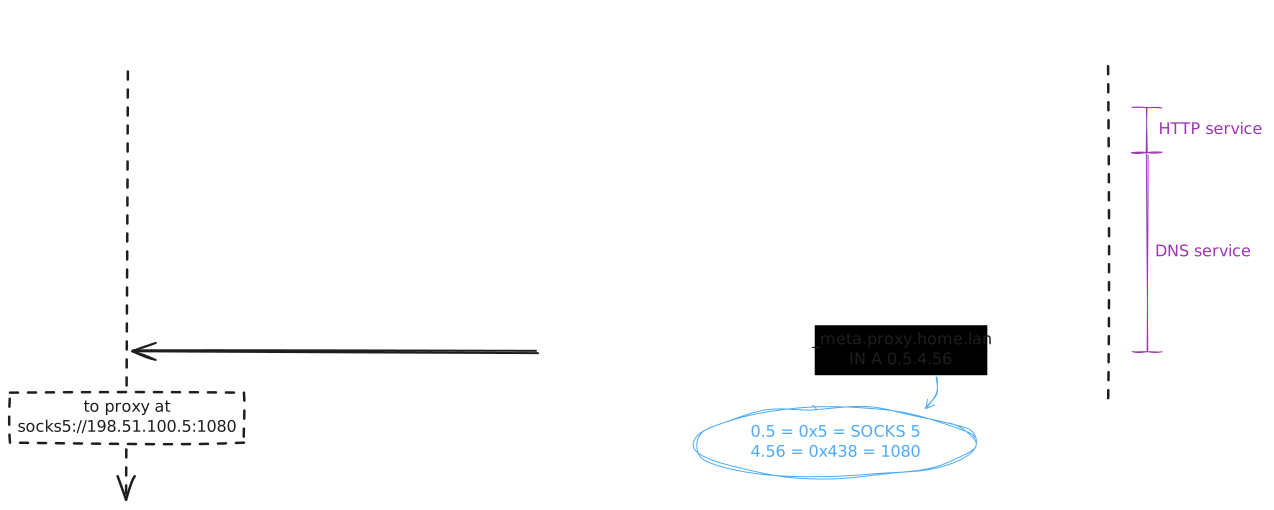
The browser itself doesn’t do much out of the ordinary: it fetches its PAC file from the URL I gave it and interprets FindProxyForURL. We have already gone through what we do in that function but let’s see how it unfolds.
First, to figure out whether or not a proxy should be used for hidden.com, we send out a DNS query for hidden.com._host.proxy.home.lan. That query will arrive wherever your local DNS server is. At this point, a DNS forwarding rule is defined to send all queries for proxy.home.lan to the magic service. In my case, this takes the form of a dnsmasq forwarding rule on my home router: /*.proxy.home.lan/192.0.2.1#5354. It might be possible to configure system resolvers to behave this way as well, if you can’t do much about the local router.
At this point, the magic service, listening on UDP 5354, receives the query and figures out the proxy situation. For my little PoC I used a hardcoded list of domains while the proxies were provided by a free API I found online. Again, since it’s a terrible idea to use a public proxy blindly, I won’t advertise it here…
Back in the browser, we send another query, this time to _meta.proxy.home.lan, to figure out the proxy protocol and port number. In the example above, the magic service replies with 0.5.4.56. We convert that to a 32-bit unsigned int (328760) which we unpack into two 16-bit parts (5, 1080). That gives us the SOCKS protocol version and the port. At this point, FindProxyForURL has everything it needs and tells the browser where to go.
The no proxy case is simpler: we stop after the _host query (which returns NXDOMAIN) and the browser goes to the URL directly, as instructed.
Going further (or not)
First of all, if for some reason you’ve read this far: are you okay? To be fair, you could write a quick browser extension that does all of this in a much nicer (but boring) way. Here I was curious to see if I could find a way to transparently expose a dynamic, selective proxy to all my devices. If I were to use DHCP or DNS discovery, it would work. The design allows me to pick specific domains for proxying while still enjoying my untethered Internet uplink for everything else. I can even proxy out some parts of a website but not others, which is nice.
One feature I did go around and play with was the proxy selection. Because I am using free open proxies here, I do lose them regularly throughout the day, or they become so slow that you can’t get more than a few packets through. To work around that, every time my proxy gets slow, I sample another set from the API and measure how many bytes I can download through them in a few seconds. The one that gets the highest count wins and becomes the new proxy. A neat side effect of this is that I distribute however little bandwidth I need across multiple servers. In the future, I might make it possible for the magic service to spawn and manage a VM on a public cloud provider, to serve as my dedicated proxy.
Security-wise, I tried to stick to what I’d call the bare minimum. I only support SOCKS because that operates at layer 4, meaning I am able to complete a TLS handshake with the remote and thus make it difficult for anyone to peek into my HTTP traffic. I did also keep DNS out of the proxy (SOCKS5 can relay that for you too). Because of TLS SNI though, the hostnames still get leaked, so no real privacy here. The proxies also see the IPs I’m reaching out to, but nowadays most of that will just reveal a big cloud provider with millions of websites hiding behind it.
Finally, I did consider implementing a local proxy instead. I would push all my traffic through that and it would route it either directly or through another upstream proxy, based on the list. The issue I am having with this is that I will most likely create a new bottleneck there. The proxy would be running on my home router, which isn’t exactly a networking beast. I guess I could keep it all at layer 4 using SNIs though (inspired by tls2httpconnect). Generally speaking I’d rather avoid running too many things on routers. There was the option of running the proxy on the home server, but that would have added two hops from the router and back, so meh.
All this to say: don’t let anyone tell you which piece of public content you can and cannot have access to. Be safe, but be free!